Back to Home
Back to Logs
How to Become a Pro with Scraping Youtube Videos in 3 minutes
Posted on July 31, 2021
Topics:
Python
Web Development
Original post is here.
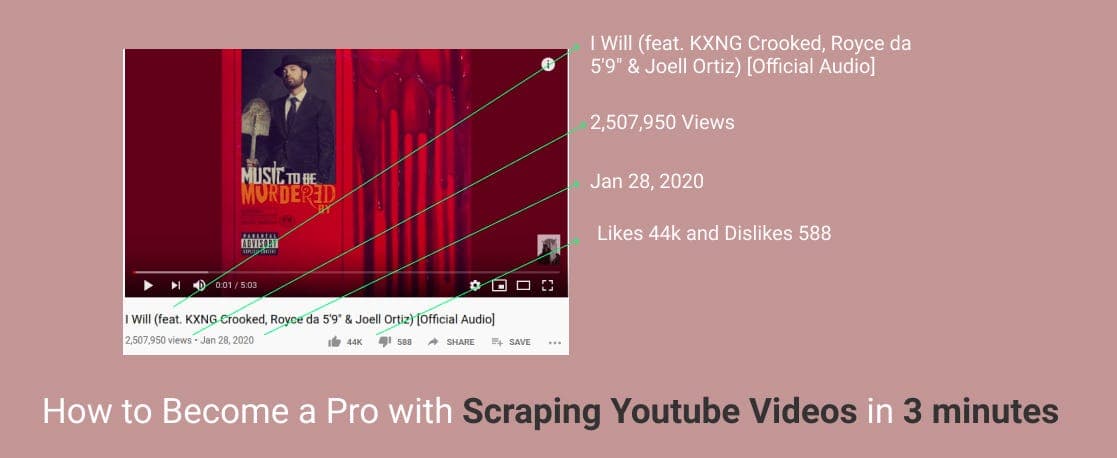
If you are here I assume you are interested in doing fun with web scraping. Great! In general, Web Scraping is a way of extracting information from websites automatically.
How this post can help you? I’ve found two reasons (there may be many more) for you to go through this post.
1) You are very much excited about scrapping
2) You may get help from my tutorial for your project
Right now I am working on an application (similar to Reddit and TopBuzz), its one of the core tasks is scrapping articles, videos from listed websites. Last day, I developed a small module. The module is only responsible for scrapping particular video information from a URL (eg. url). To share how I did this, in this post, we will walk through an example of extracting youtube video information with the help of Python.
Note: Web Scraping code depends on the structure of the web page. If the structure changes, you have to update your code too! 😒
Why Python?
In my opinion, in case of web scraping, there are no programming languages that are better than Python 🔥. And Python provides necessary packages specially for web scrapping (eg. beautifulsoup).
Setup
Before starting the tutorial, you have to setup Python environment. Install virtualenv which is going to be responsible for managing a particular project’s packages. It intends to make an isolated Python environment.
pip install virtualenvCreate a folder named utube (or what you want), inside this folder run
virtualenv venvActivate the virtual environment,
source venv/bin/activateAdd requirements.txt file, which lists necessary packages,
bs4==0.0.1
requests==2.22.0
Get the HTML Content and Meta Data
Now fire up your favorite text editor and create a file called main.py, import beautifulsoup, and requests
https://gist.github.com/mrron313/19c7bcd474d655f527ab29a2302eeea8#file-import_pack-py
The target youtube video link is assigned to the link variable. As I am a big fan of Eminem, I put a video link one of his songs 😊. Below two lines will turn the HTML content of the given link into a structured tree.
https://gist.github.com/mrron313/6f00a98ee9fc2e072070faeafdcbdabc#file-parse_html_data-py
print(soup.prettify())soup variable shows metadata (related information of the video, eg. title, description, thumbnail, etc). Also, you will see the full raw HTML content of the given page.
Inspecting and Extracting Video Information
metadata and HTML content
One of the important parts of scrapping is inspecting the webpage. Let’s examine and extract.
Find your necessary information and Extract
➼ Title of the Video
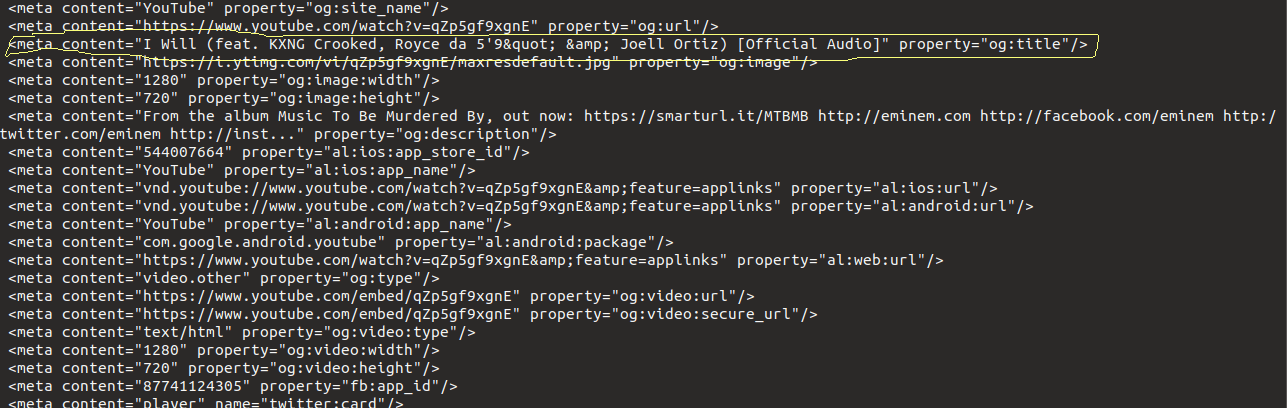
Title in the meta tag
https://gist.github.com/mrron313/c12dc1a727177fb662d67eda4ab4da4e#file-extract_title-py
The above two lines (lines 1–2) will get the title from the metadata. Others data like thumbnail, description, type can be found in metadata. If you don't discover the necessary info in meta tags, try to identify them in HTML body content.
➼ Thumbnail of the video
Extracting the thumbnail is similar to the title extraction.
https://gist.github.com/mrron313/7f052d2c5fa62fbf5a26eb4948109bde#file-extract_thumbnail-py
➼ Views
Views count is not listed in the metadata.
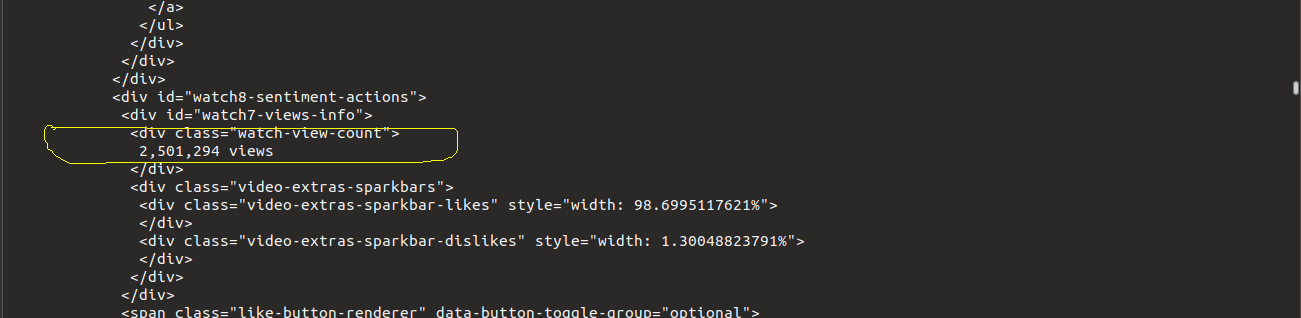
Views Count in HTML Content
But no worries, we can retrieve it from HTML tag by this way,
https://gist.github.com/mrron313/67bb4bb374cdad7c36199f97be35d532#file-extract_views-py
find method searches for the tag whose class is “watch-view-count”. And then we get the text.
➼ Others Info — Category, Published Date, Likes Count, Dislikes Count
https://gist.github.com/mrron313/e642e111f332f5bda8fc94dadc9bf1ab#file-published_cat_like_dislike-py
Code and Output
➼ Complete Code
https://gist.github.com/mrron313/5da60288ef86befa812303e1f1362cf1#file-main-py
➼ Output

So simple! right? Now I hope you can play with different links, playlist links, channel links of Youtube.
Web Interface
Bonus! I have developed a web interface for scraping a single youtube video to make the technique more useful and handy. Have a look,
API is built with Flask and Frontend is by VueJs. Complete code is available here — Github.
Happy Learning!