Back to Home
Back to Logs
How I make OTP Service that works like Facebook Account Kit
Posted on July 31, 2021
Topics:
Web Development
Laravel
Original post is here.
If you ever used OTP gateway of Facebook Account Kit, you already know that Facebook shut down this service. It is sad news for all developers. Because we were getting this flawless service for free. In September 2019 Facebook announced this,
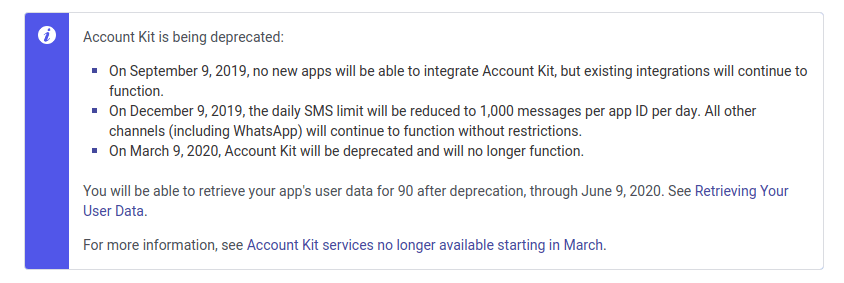
During that time, our client of Esho Sikhi wants us to develop the same OTP mechanism. I was thinking about how can I design such a system!! Then I realized before starting to make this, I should know how the OTP system of the Facebook Account Kit works. In this post, I will show you how I have developed the OTP gateway for my project (Esho Shikhi) which works as same as Facebook’s OTP kit.
What I used —
- Process of Facebook Account Kit
- SSL SMS Gateway
- Database
OTP Request
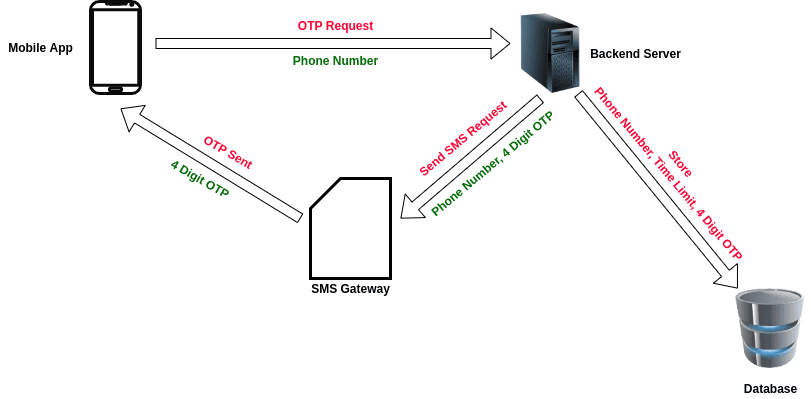
OTP Request from Mobile Application
At first, from the Application user enters his phone number and submits. The request is sent to the backend server. The server generates a 4 digit OTP and sends a request to SMS Gateway to deliver the OTP to the user. Next, the user gets OTP on his mobile. Meanwhile, the server stores 4 digit OTP, phone number, time limit of OTP, and the status of OTP (used or not used). Based on the phone number and time (in milliseconds), a unique hashed code is generated and stored in the Database.
OTP Validation
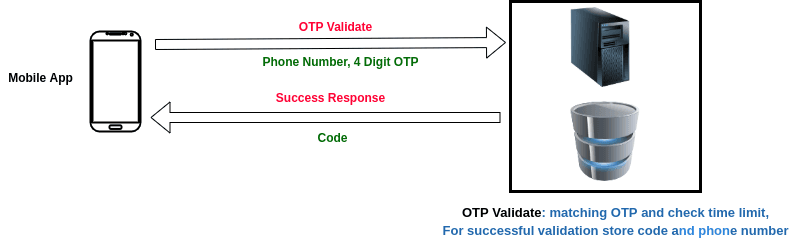
OTP Validation in Backend
To validate the OTP, the user enters the OTP in the second form and submits it. The server validates the OTP based on the information stored in the Database (for validating OTP — 4 digit OTP must be matched, must be unused, must be less than or equal to the time OTP expires). If the OTP is valid, the hashed code is sent to the mobile application.
Login Service
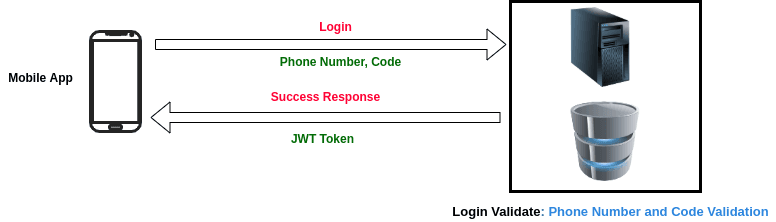
Final Login after OTP Validation
In the last part, the user logins by providing his phone number and the code which was given in the last step. After a successful login, the user gets the JWT token in response.
Later, the user uses the JWT token to call the authenticated API of the backend server.
So, this is how I integrated the OTP service in my project. If you face a similar problem, you may get help from this post. This process is currently working flawlessly. For any kind of questions regarding this service, through a response below.
Happy Learning!